

The FAQs hereunder are in no particular order. Browse to the end to review FAQs. If you require additional assistance, please email Support@globalcoachgroup.com. They will reply to your inquiry within 1-2 business days (depending on your subscription level).
Coaches see and control the client experience
As a coach, you want to ensure high-quality service delivery and control over the process. Therefore, you will receive copies of all emails sent to the leader and their coworkers. This allows you to see what the clients see and fully control your service delivery.
Use your professional email address for GCG Coach Dashboard and GCG Coaching Tools
To access your GCG coach dashboard and utilize GCG coaching tools, the same email address is used. We recommend you use your professional email. In the event that GCG has updated your account email address as per your request, all future emails related to the newly opened coaching tools will be directed to the new address. Any coaching tools previously opened under a different email address will continue to use that email until the tool (FF, AP or Pulse) is closed.
Test to ensure your clients receive your coaching tools email (templates)
There might be cases where a private network's firewall will block emails. For this reason, you should always first test if recipients receive your emails before starting a new engagement. To do so, go to "Email Templates" on your left bar menu and click on "Test Email Template". A window will appear where you can input the test email recipient's address. After sending the test email, check if the recipient has received it. Make sure to check the recipient's Spam and Trash folder as well.
(The video hereunder is a screencast with no audio)
Whitelist Global Coach Group Domains
It is recommended to whitelist our domain to ensure email deliverability and survey access. It is best to do this beforehand to avoid scrambling to resolve it later. You can send the following information to the IT organization of your email recipient.
Please whitelist any emails originating from the Global Coach Group domains on your anti-spam systems. This will ensure the smooth delivery of any survey emails your organization will be receiving as part of any projects we are conducting within your organization. If you are not able to filter by domain name (which we strongly recommend), you can whitelist our outgoing email server and/or its IP address:
GCG domain urls used:
GlobalCoachGroup.com
https://gcgroup.io/
https://survey.gcgroup.io/
If the recipient is still not able to receive the email or access the survey links, kindly contact their IT team or the person in charge of their organization and discuss how they can support you.
Survey Accessibility
Within certain organizations, IT departments sometimes restrict access to websites from within their network, a practice more prevalent in institutions dealing with sensitive data and stringent security requirements, like banks and healthcare services. Some of these organizations operate complex IT environments to oversee email systems and manage internet access via web links, a necessity, particularly when they employ a sizable remote workforce. In these cases, they often implement a well-crafted combination of firewalls and Virtual Private Networks (VPNs). It's worth noting that each organization tailors its IT infrastructure to the specific requirements of its employees.
Based on our experience, users consistently receive our emails and can effortlessly access the GCG survey links. To ensure smooth delivery and survey collection, request the organization's IT to whitelist the survey domains
If users encounter any difficulties, share with them the following information for guidance:
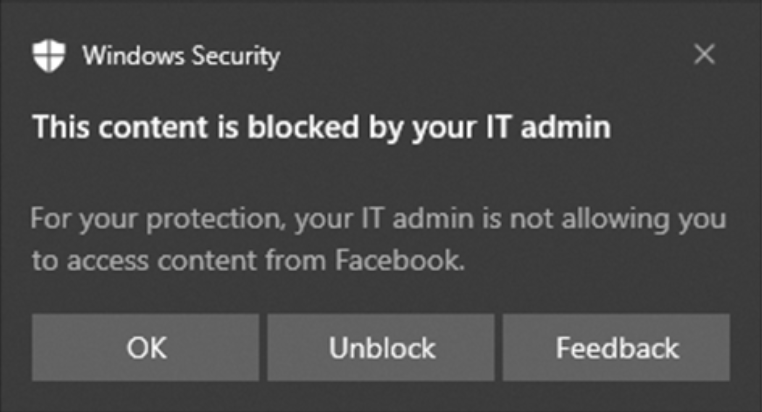
1. Windows Security Pop-Up
Some organizations show users an MS Windows Security pop-up like the one below, then users can simply click "unblock" and continue.
2. General advice to other users
In the rare case that the organization’s IT environment blocks survey links, users get this message:
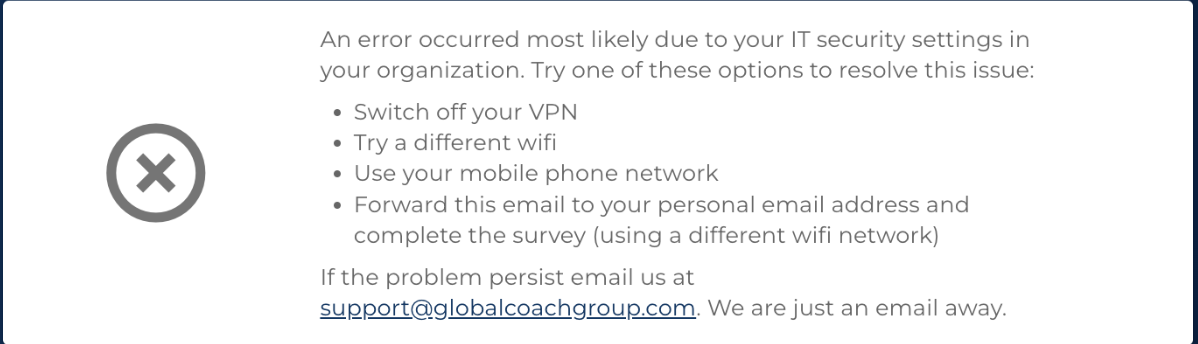
This guides them to choose the following actions:
1. Switch off the VPN and access the internet directly
2. Use a different internet access
3. Use a mobile network to access the internet instead of wifi.
Most organizational users have experience navigating these challenges, as they often face common issues with other web services.
The leader does not have access to their engagement (Feedforward or Action Plan)
Only coaches have access to the GCG Coaching Tools platform. Leaders do not have login access and cannot view or edit any information in their engagement. If you would like to share the feedforward collected with the leader, use the “Email FF History to the Coach” button at the bottom of the Feedforward screen. You will receive an email containing the collected responses. From there, you can review and edit the email before forwarding it to the leader.

The same applies to the Action Plan. You can forward the drafted action plan by email, review and edit it, and then share it with the leader. The leader can make their own edits and send it back to you. Once you receive their updates, transfer the correct details into the Action Plan in the GCG Coaching Tools and publish it.
Go to:

At the bottom of the screen, you will see:

The GCG Coaching Tools are designed to empower the coach to manage the process—including how and when to engage with the leaders and coworkers. For IT security and data protection reasons, access is intentionally limited to coaches only, with no access granted to third parties.