

The FAQs hereunder are in no particular order. Browse to the end to review FAQs. If you require additional assistance, please email Support@globalcoachgroup.com. They will reply to your inquiry within 1-2 business days (depending on your subscription level).
Drafting Action Plans using the most recent AP
When starting a new AP, you have the option to copy actions from the most recently published AP into the draft AP.
Daily and Weekly Actions
Successful leadership change revolves around actions that leaders can consistently execute, particularly those within their daily or weekly routines. Actions carried out on a monthly basis typically garner less attention and exhibit a limited influence on coworkers, rendering the change going unnoticed. Hence, the creation of an action plan prioritizing daily and weekly tasks is imperative. For instance, a daily action may entail acknowledging at least two coworkers for a job well done, while a weekly action could involve scheduling a one-on-one business follow-up meeting with two coworkers.
Reorder Actions during AP drafting
When you are in AP drafting mode, you can easily rearrange the action items by simply dragging and dropping them. However, once the AP has been published, this function is no longer available, even in the editing mode. This is because the leader's AP survey has already been published, which restricts any changes to the order of action items.
Delete Actions (during AP drafting)
To delete AP items in draft mode, empty the text box and click on Save. The empty AP items will then disappear.
However, once the AP has been published, this function is no longer available, even in editing mode. This is because the leader's AP survey has already been published, which restricts any changes to the order of action items. The easiest workaround is to replace the AP item text with a "." (dot).
Edit / Republish / Resend the AP to Coworkers
Once you have published the AP, you can return to the Draft Action Plan mode to make edits to the AP items. You cannot delete AP items (just use e.g. "."). After making the necessary changes, you can then republish the AP to all coworkers. Additionally, you can make use of this feature to resend the AP to the coworkers, at your discretion. Once you close the data collection, you cannot reopen the AP.

Reviewing AP implementation by the leader
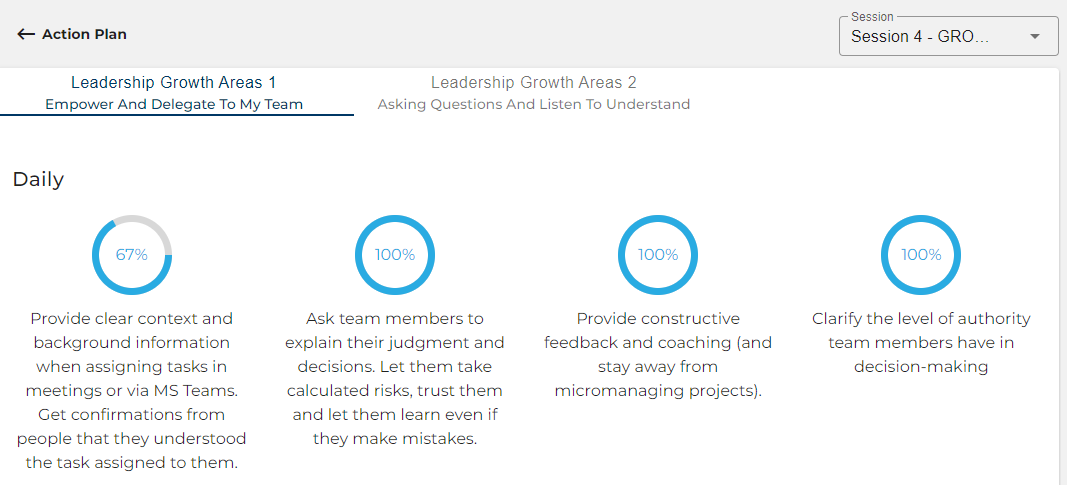
As a coach, you have two ways to evaluate the implementation of the Action Plan (AP) by the leaders and their adherence to the daily and weekly actions. This helps in recognizing progress and providing coaching for further momentum.
1. The 'View Results' button gives you a high-level overview of the completion percentage. This enables you to quickly identify where the leader is making good progress and where more attention is required.

2. To get a comprehensive day-to-day summary of the leaders' individual behaviors over time, you can review their checklist by clicking on the survey link. Just copy the link and paste it into your web browser. This will give you a better understanding of when the leader is making progress effortlessly and where more focus is required.
AP Survey - Calculation of Completion %
The calculations for completing the action plan are based on a five-day workweek. The follow-up survey includes seven tick boxes for daily actions. However, if Leaders tick at least five out of the seven boxes, they will receive a 100% score. The reason for having seven days in the follow-up survey is to accommodate leaders that have workweeks that start e.g. on Sundays and end on Thursdays, instead of Mondays to Fridays.
Accountability is more important than accuracy. The follow-up survey aims to promote self-discipline and accountability for the leader, while also helping the coach understand the leader's progress in implementing their action plan. Additionally, the survey allows the leader to document their implementation plan based on their own perspective. While we acknowledge that this approach may not be perfect, it serves to facilitate a productive discussion between the leader and coach during the coaching session. This discussion covers the GDD (good, difficult, different) aspects of the leader's progress made over the past 30 days, which is reviewed at the beginning of a coaching session.
Closing AP Data Collection
Once the AP data collection has been closed the AP cannot be reopened. Therefore, only close the AP data collection once the leader has completed the current AP implementation and you are about to publish a new AP for the leader.
